
Bench, 2021 tutorial arm
Drift report
Every time the agent had to leave a step of the skill, it noted it. Deduplicated, most frequent first. This weekend every note is a gap of coverage, the video shows another path, and none is a renamed or moved button.
Replay of 7 November 2026, read from report and work
- Drifts noted
- 4, each seen in 1 run of 11
- Runs passed anyway
- 3 of 11, verdict read in SQL
- Tutorial age
- 5 years, 5 February 2021, never re-recorded
| Where the agent left the video | As the agent wrote it | Seen |
|---|---|---|
| The tutorial creates the invoice from an approved purchase order. Here it was created directly from Billing, Supplier invoices, New invoice, a path the tutorial does not detail. | Le tutoriel montre la création depuis une commande fournisseur approuvée, ici la facture a été créée directement via Facturation > Factures fournisseur > Nouvelle facture (chemin alternatif non détaillé dans le tutoriel) | 1 of 11 |
| The tutorial uses predefined product lines. Here a free line of type Product was typed by hand, a function the video never shows. | Le tutoriel utilise des lignes 'Produits prédéfinis', ici une ligne libre de type 'Produit' a été utilisée avec description manuelle 'Ramettes A4 x20' (fonction non montrée dans le tutoriel) | 1 of 11 |
| Creating it directly from the Billing menu is not covered by the tutorial. | La création directe depuis le menu Facturation > Factures fournisseur > Nouvelle facture n'est pas couverte par le tutoriel (chemin alternatif non montré) | 1 of 11 |
| The path used was Billing and payment, Supplier invoices, New invoice, because the task names no purchase order, while the tutorial starts from an approved order. | Chemin de création utilisé : Facturation | Paiement > Factures fournisseur > Nouvelle facture (création directe, sans commande), car la tâche ne mentionne aucune commande fournisseur, le tutoriel montre la création depuis une commande approuvés | 1 of 11 |
Where the video and the task part ways
The moments of the video these notes point to.
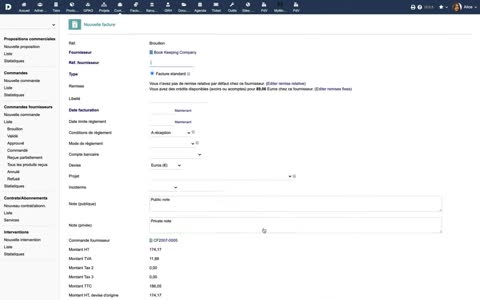
0:57 0017.jpg“vous pouvez créer une facture fournisseur en cliquant sur le bouton qui convient.”
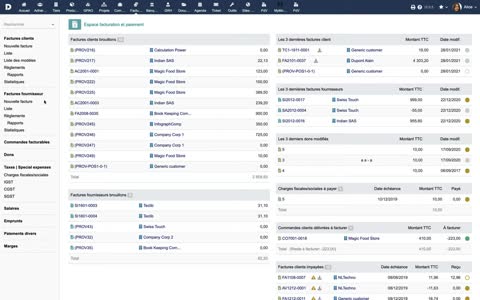
1:27 0024.jpg“sous l'onglet Facturation et paiement.”
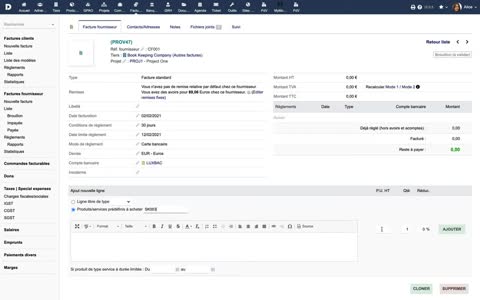
2:25 0036.jpg“vous pouvez ajouter des produits et des services avec les informations de prix pour ceux-ci.”